Agentic is in beta — some features may not work as expected.

Agentic

The AI assistant that lives on your Mac and does things for you.

Agentic doesn't just chat — it searches the web, manages your files, runs commands, and operates your apps for you. Free to run, and fully usable with VoiceOver.

macOS 14+ · Apple Silicon · Free · No account required to start (local model)

See it in action

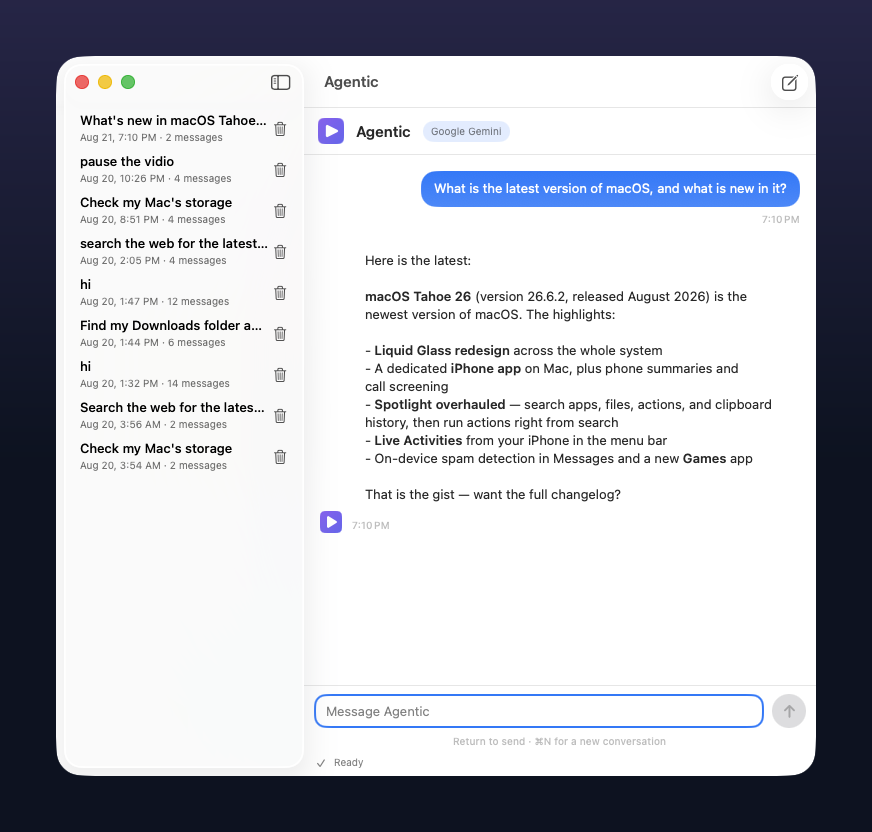
A real Agentic conversation — it delegates research to a subagent, then operates your apps and screen for you.

A conversation with Agentic: it answers a question about the latest version of macOS with bolded highlights, shown next to the saved-conversation sidebar.
Agentic answering a question about the latest macOS, live in the app.

Features

One app, 32 built-in tools. Here is everything Agentic can do, grouped by area.

Six providers, $0 to start

Begins with a model that runs privately on your own Mac; switch to Gemini, OpenRouter, Groq, OpenAI, or OpenCode Zen anytime.

  • Local model is private and unlimited
  • Free tiers on every cloud provider, including OpenCode Zen’s rotating free models
  • Your API keys never leave your Mac

Real automation

It runs actual terminal commands on your Mac and shows you the output — not a simulation.

  • Install software and manage files
  • Destructive commands always ask first
  • Every step logged in plain language

Files & code

Finds, reads, writes, and edits files anywhere you allow — and explains what it changed.

  • Search by name or by content
  • Careful, reviewed edits
  • Writes always need your approval

Web & research

Browses the web inside its own browser window — you watch it click, type, and read pages live. Plus live search with real sources.

  • Browses in a built-in window you watch
  • Clicks and fills pages precisely
  • Reads any page on request

Sees & controls your screen

Looks at what's on screen and operates your apps itself — clicking, typing, and scrolling for you.

  • "Open YouTube and play this video"
  • Great for repetitive clicking and forms
  • Only acts when you ask it to

Natural reminders

"Remind me in 10 minutes to stretch." It schedules it — then fires with a sound, a notification, and a spoken announcement.

  • Plain-language scheduling
  • Works even without notification permissions

Subagents for big jobs

Delegates focused pieces of work to researcher, implementer, or verifier subagents, then combines their reports into one answer.

Nothing gets lost

Every conversation is saved automatically. Reopen any of them from the sidebar or the menu bar, anytime.

Made for VoiceOver

Built voice-first by a VoiceOver user: every action, approval, error, and finished answer is announced out loud.

  • Custom sounds for ready vs. errors
  • Clear labels on every control

Browse all 32 tools in the docs →

Frequently asked questions

Is it really free?

Yes. The default provider runs a model on your own Mac (Ollama), which costs nothing. The cloud providers offer free API tiers; paste a free key in Settings if you prefer one of them. OpenAI is also supported and is billed per token.

What Macs does it run on?

Agentic needs macOS 14 or later and an Apple Silicon Mac (M1 or newer) — Intel Macs are not supported. It was built and tested on macOS 26.

Why does macOS show a security warning?

Agentic is not notarized by Apple yet, so macOS can't verify its developer when you first open it. It's safe and signed, and your messages stay on your Mac unless you use a cloud provider. To open it, right-click (or Control-click) the app and choose Open, then confirm. You only do this once.
Does it work with VoiceOver?

Yes — VoiceOver support is a core feature. Every step, approval, error, and finished response is announced, buttons and lists have clear labels, and the app plays its own sounds so you know when something happens.

Is my data private?

With the local model, your conversation never leaves your Mac. With a cloud provider, your messages are sent to that provider under their privacy policy. Conversations are saved on your Mac in Application Support and can be deleted anytime. See the privacy page for the full picture.

More questions? See the full FAQ in the docs →

Ready when you are

Download Agentic for macOS, grant permissions once, and start talking to your Mac.

Download Agentic

Built by Yousef Elbanna · a one-person project, improved continuously · Send feedback

Agentic 1.5 · August 2026 · See what's new →

Agentic.dmg · 4.0 MB · Apple Silicon · macOS 14+

Verify your download (SHA-256) b44db2bb185d325fab015fc1946063c2cd01784b083df710c80f6159b6dae2fb

First launch: macOS shows a security warning because the app is not notarized yet — right-click the app, choose Open, then confirm. You only do this once.